
- May brings longer days, rising temperatures, and let’s be honest — a lot more screen time.
- Whether it’s late-night Netflix, weekend gaming marathons, or endlessly refreshing social media, kids’ digital habits tend to creep out of balance this time of year.
- As a parent, here’s how to help them reset before summer turns “a little extra screen time” into an all-day habit.
- Why May Is the Right Time to Step In With summer just around the corner, routines loosen and screens fill the gap naturally.
- Getting ahead of it now, before the long holidays hit, makes the whole summer easier to manage.

May brings longer days, rising temperatures, and let’s be honest — a lot more screen time. Whether it’s late-night Netflix, weekend gaming marathons, or endlessly refreshing social media, kids’ digital habits tend to creep out of balance this time of year. As a parent, here’s how to help them reset before summer turns “a little extra screen time” into an all-day habit.
Why May Is the Right Time to Step In
With summer just around the corner, routines loosen and screens fill the gap naturally. Getting ahead of it now, before the long holidays hit, makes the whole summer easier to manage.
You don’t need strict rules or constant monitoring. Small, consistent guidance is enough.
Practical Ways Parents Can Help Kids Build Better Screen Habits
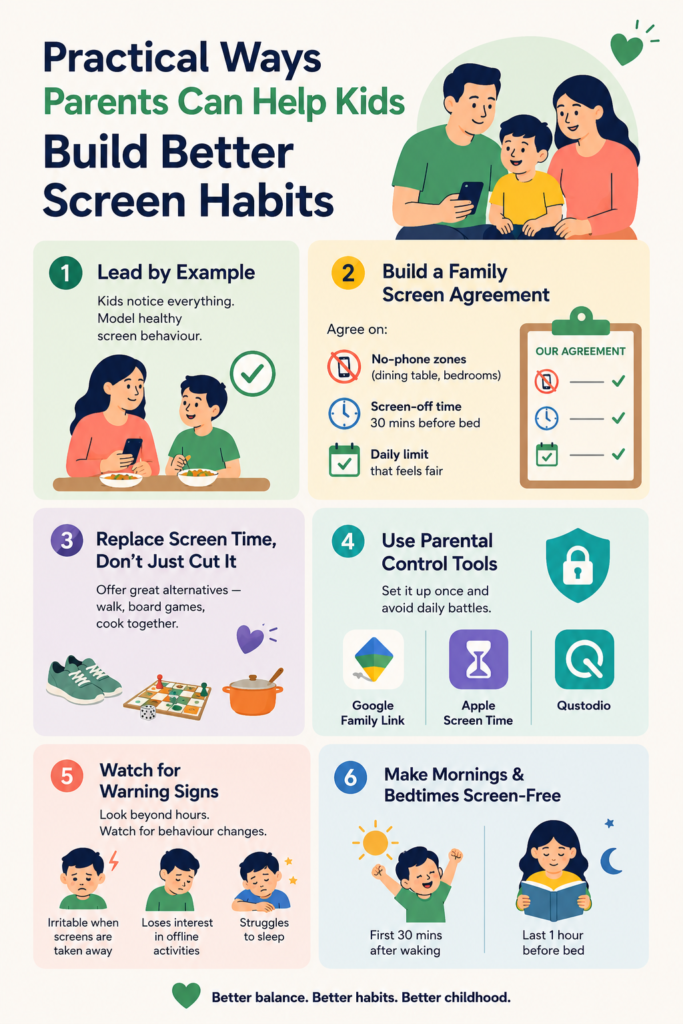
1. Lead by Example Kids notice everything. If you’re scrolling at dinner, no rule you set will stick. Modelling healthy screen behaviour is the most powerful tool you have.
2. Build a Family Screen Agreement Together Involve your child in setting the rules — they’re far more likely to follow limits they helped create. Agree on:
- No-phone zones (dining table, bedrooms)
- Screen-off time 30 minutes before bed
- A daily limit that feels fair, not punishing
3. Replace Screen Time, Don’t Just Cut It Restriction without substitution breeds resistance. When screen time ends, have something ready — a walk, a board game, cooking together. Make the alternative appealing, not a consolation prize.
4. Use Parental Control Tools Let technology do the heavy lifting:
- Google Family Link — great for Android users
- Apple Screen Time — seamless for iPhone families
- Qustodio — cross-device and highly customisable
Set it up once and avoid the daily negotiation.
5. Watch for Warning Signs More than hours, watch for behaviour. If your child becomes irritable when screens are taken away, loses interest in offline activities, or struggles to sleep, it’s time to reassess, not just set a timer.
6. Make Mornings and Bedtimes Screen-Free The first 30 minutes after waking and the last hour before bed are the most important windows to protect. They directly affect mood, focus, and sleep quality.
Recommended Screen Time by Age
| Age Group | Daily Limit | Parent Tip |
|---|---|---|
| Under 5 | 1 hour max | Always co-watch and discuss |
| 6–12 years | 1.5–2 hours | Prioritise educational content |
| Teens | 2–3 hours (non-academic) | Involve them in setting limits |
The One Thing That Makes All of This Work
Consistency. You don’t have to be perfect, but you do have to be steady. One screen-free dinner a day, one phone-free morning on weekends. When kids see boundaries applied calmly and consistently, they stop pushing back as hard.
It becomes the norm, not the battle.
FAQs
Q1. How do I enforce screen limits without daily arguments? Involve your child in making the rules — kids respect boundaries they helped set.
Q2. Does educational screen time count toward the daily limit? Yes, but it’s lower risk. Interactive and learning-based content is far better than passive scrolling.
Q3. My teenager refuses all screen limits — what do I do? Start with conversation, not restriction. Understand their usage first, then agree on boundaries together.
Q4. What’s the best free app to manage kids’ screen time? Google Family Link and Apple Screen Time are free, reliable, and simple to set up.
Q5. Can screen time affect my child’s sleep even with night mode on? Yes, stimulating content matters as much as blue light. An earlier cut-off time helps more than filters alone.
Helping your child build healthy screen habits in May sets the tone for the whole summer and beyond.
Infrastructure, facilities, and experienced teachers are a big asset to the learning & development of students, be it for Nursery, Primary or Senior children making Vega Schools the best schools in Gurgaon. For information about admission, please visit the Vega Schools campuses in Sector 48 and Sector 76 Gurugram. Get the best education for you child in New Gurgaon and be part of the top school infrastructure for sector 78, Sector 83, Sector 85, Sector 90, Sector 102, Sector 106 in Gurgaon, near Dwarka Expressway.